
Stripe Dashboard
Stripe, LLCBusiness
4.23.27K Reviews
- Version
- 2.92.0
- Installs
- 1.00M
- Age Rating
- Everyone
Screenshots
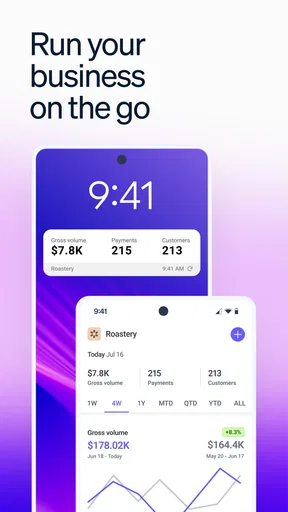
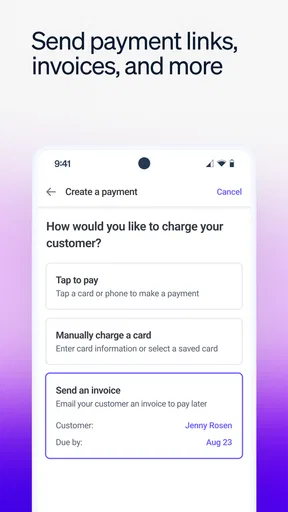
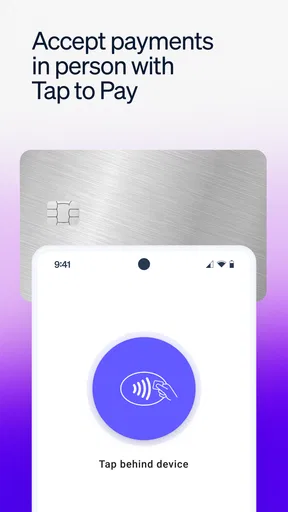
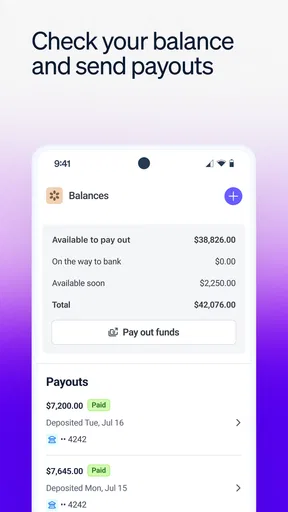
Our Review of Stripe Dashboard
 Analysis by Appyee
Running a business from a phone sounds simple until a customer asks whether a payment went through, a transfer needs checking, or the day’s figures suddenly look different from yesterday’s. Stripe Dashboard is built for that in-between work. I tested it as a mobile companion for a Stripe account, and my impression is clear: it is most useful when you need a quick view of payments and business activity without opening a desktop browser.
This is a free business app from Stripe, LLC, aimed at people who already use Stripe to handle payments. It is not a complete replacement for every part of a finance workflow, but it gives a business owner or operator a practical way to stay connected to payment activity while away from a computer. I would recommend it to freelancers, online sellers, small teams, and anyone who needs mobile visibility rather than a full accounting workstation.
What the mobile dashboard is really for
The app’s central value is not that it turns a phone into an entire back office. Its value is that it puts important Stripe activity close at hand. The store summary describes it as a way to accept payments and track business metrics, while the short description simply calls it Stripe Dashboard. In everyday use, that positioning makes sense: this is a monitoring and management tool for a Stripe-based business, not a general-purpose banking app.
I found the distinction important because expectations can easily become too high. If you want to review payment activity, keep an eye on business performance, and respond to routine questions while traveling, the app fits naturally. If you need detailed bookkeeping, broad inventory management, payroll, or a complete replacement for a desktop finance system, you will probably still need other tools.
The strongest use case is the person who receives a message such as, “Has my payment gone through?” Instead of waiting until you return to a laptop, you can open the dashboard and inspect the relevant activity. That small convenience becomes meaningful when the business operates throughout the day and decisions cannot wait for a fixed office routine.
I also see value for small teams where one person handles customer communication and another handles the wider financial workflow. The mobile dashboard can serve as a quick reference point during a call or while away from the main workstation. It helps reduce the need to guess based on email notifications or memory, although I would still treat the desktop environment as the better place for deeper investigation and administration.
Speed in ordinary checks
For a mobile business app, perceived speed matters less than animation or visual polish and more than how quickly it gets you to a useful answer. Stripe Dashboard feels designed around short visits: open it, check activity, confirm a figure, and leave. That is the right design goal for a payment companion because most people are not trying to spend an afternoon inside it.
My practical advice is to use it for focused questions rather than wandering through every available area. Before opening the app, decide what you need to verify: a recent payment, a trend in business metrics, or the status of activity that needs attention. This makes the experience feel faster because you are using the dashboard as an operational instrument instead of expecting it to behave like a full desktop console.
Network conditions will naturally affect any app that displays current business information. A slow connection can make a quick check feel uncertain, especially when you are waiting for information that affects a customer conversation. I would avoid making a promise based only on a screen that has not clearly refreshed. When the answer is financially important, give the dashboard time to load and compare the context of the transaction rather than relying on a hurried glance.
That is one of the less obvious habits that improves the experience: separate “I opened the app” from “I confirmed the current state.” A mobile dashboard is valuable because it is convenient, but convenience should not encourage rushed decisions. For routine checks, it is excellent. For a disputed or unusually complex payment situation, I would move to the fuller Stripe workflow on a computer.
When activity becomes heavier
The app becomes more demanding during busy periods, not necessarily because the phone is doing complicated local work, but because the amount of business activity you need to interpret increases. A quiet day may require one glance. A busy launch, promotion, or sales period can produce a stream of transactions that makes the dashboard harder to use as a quick snapshot.
In those moments, I would use the phone to identify what deserves attention and the desktop dashboard to perform a more deliberate review. That division is practical. The phone is close, immediate, and useful for triage; the larger screen is better when you need to compare several pieces of information or investigate an issue without losing your place.
A helpful workflow is to check activity at natural transition points rather than repeatedly refreshing throughout the day. For example, after a campaign begins, I would look for broad movement first, then investigate individual items only when something appears unusual. This avoids turning the app into a source of constant distraction and makes its business metrics more useful for decisions.
Another trade-off appears when several people are involved. The app may be convenient for a business owner who wants a fast overview, but a team handling many operational details can outgrow phone-first monitoring. In that setting, the mobile experience works best as an alert-and-awareness tool, while the main work remains organized elsewhere. I would not choose it as the sole interface for a high-volume operation simply because mobile access is convenient.
Stability and recovering from interruptions
A business app earns trust through consistency. When I am checking a payment or a metric, I care more about reaching the right information reliably than about having an elaborate interface. Stripe Dashboard benefits from its focused purpose: it is connected to the Stripe business environment rather than trying to become a broad collection of unrelated tools.
Still, mobile use is full of interruptions. A call can arrive, the phone can lock, or the connection can change when moving between networks. My recommendation is to treat an interrupted session as a reason to recheck the current screen rather than assuming that the previous view is still current. This is especially important when you return to the app after handling something else.
The recovery habit I found most sensible is simple: reopen the relevant area, allow the information to load, and verify the item again before replying to a customer. That may sound cautious, but it is the right balance for payment-related work. A fast app that encourages an incorrect answer is less useful than a slightly slower check that gives you confidence.
I would also keep a clear boundary between monitoring and resolving. The mobile dashboard can help you notice that something needs attention, but unusual payment situations may require more context than a small screen provides. When the issue involves several related transactions or a complicated customer history, switching to a desktop browser is not a failure of the app. It is the sensible recovery path when the mobile view is no longer enough.
Device age, operating system, and resource expectations
The application supports Android devices running version 8.0 or later, which gives it a broad reach across older and newer phones. That is useful for small businesses because not every owner upgrades devices frequently. At the same time, support for an older operating system should not be confused with identical performance on every phone.
On a newer device, a focused dashboard app should feel more comfortable during repeated checks, especially when other work is happening on the phone. On an older device, the experience may depend more heavily on available memory, background activity, storage condition, and connection quality. I would not buy a new phone solely for this app, but I would avoid using a struggling, outdated device as the only way to monitor important business activity.
The application is free and carries an Everyone age rating, making it easy to consider for a wide range of business users. The free price removes an obvious barrier for a freelancer or a small shop testing a mobile workflow. It does not remove the need to understand the wider Stripe setup, however. The app is useful because it connects to a business payment environment; it is not a standalone replacement for establishing that environment.
Resource demands are best judged by how you use it. Occasional checks should be a light workload for a modern phone, while constant switching, repeated refreshes, and keeping many other apps active can make any business tool feel less responsive. I would use it in short sessions, close it when finished, and reserve extended analysis for a larger screen. That approach is better for concentration as well as battery and general device comfort.
Who will get the most from it
I think Stripe Dashboard is a particularly good fit for independent professionals who invoice or sell online and need reassurance that business activity is moving as expected. A designer waiting for a client payment, a consultant traveling between appointments, or a small online seller checking the day’s performance can all benefit from having a mobile view available.
It also suits owners who do not want every financial question to become a laptop task. If you regularly receive customer messages outside office hours, the ability to make a quick check can reduce unnecessary delays. The app is most valuable when the alternative is uncertainty, not when the alternative is an already excellent desktop routine.
Teams should think more carefully. A manager may appreciate mobile visibility, but a larger operation may need role-specific processes, detailed reconciliation, or more extensive reporting than a phone interface can comfortably provide. In that case, the app can still be useful, but I would position it as a companion rather than the center of the company’s financial workflow.
Who should choose another tool or use it only as a companion
I would skip this app if you do not use Stripe for your payment operations. Its purpose is too specialized to justify installing it merely as a general business tracker. A standard banking app, accounting package, or commerce platform may be more appropriate when your main need is cash-flow planning, tax preparation, inventory, or broad business administration.
I would also avoid relying on it alone if your work demands long reports, detailed comparisons, or frequent data entry. A desktop dashboard is usually more comfortable for those tasks, and a dedicated accounting system may be better for records that extend beyond payment activity. The mobile app’s strength is access and awareness; its weakness is the natural limitation of doing complex financial work on a small screen.
Compared with checking email notifications, the dashboard offers a more direct place to review business activity. Compared with a full web dashboard, it is more convenient but less comfortable for extended analysis. Compared with general finance apps, it is more closely tied to Stripe operations but less suitable as an all-purpose money manager. That is the trade-off I would explain to a friend before recommending it.
Useful habits for everyday work
My first tip is to create a clear “quick check” routine. Open the app with a specific question, review the relevant payment or metric, and close it once you have the answer. This prevents the phone from becoming a place where you repeatedly look at numbers without making a decision.
My second tip is to use mobile monitoring for triage. If something looks normal, move on. If something looks unusual, note what you need to investigate and switch to the fuller desktop workflow. This is more efficient than trying to solve every complicated case from a phone.
My third tip is to recheck after interruptions. If a call, message, or network change pulls you away, do not assume the old screen tells the whole story when you return. Start the check again and confirm the current context before communicating with a customer.
My fourth tip is to separate business metrics from emotional reactions. A single unexpected movement can tempt you to make a rushed decision, especially during a busy sales period. Use the app to notice patterns and decide what deserves attention, but avoid treating one quick glance as a complete business analysis.
Adoption, maintenance, and trust
The app has been available since March 22, 2018, and its current version is 2.92.0. It has passed the early-experiment stage and is used at substantial scale, with more than one million installs. Its average rating is 4.2 from around thirty-four thousand ratings, alongside roughly three thousand reviews, which suggests a generally positive reception while still leaving room for the practical frustrations that come with a business tool.
I would read those numbers as a reason to consider the app, not as a guarantee that every workflow will suit every user. Payment management is sensitive to context: a freelancer checking one transaction has a different experience from a team monitoring a busy operation. The app’s usefulness depends heavily on whether your expectations match its role as a mobile Stripe companion.
Updates matter for a tool connected to business activity, so I would keep the app reasonably current on a supported device. At the same time, I would not treat an update as a substitute for a sensible backup workflow. For important records and complex investigations, keep using the broader Stripe environment and your normal business systems rather than depending on a single phone screen.
My performance verdict
Stripe Dashboard succeeds when speed means “help me confirm what is happening right now.” It is convenient for short visits, practical for mobile monitoring, and well suited to business owners who need payment visibility away from a desk. Its focused purpose also helps it avoid the confusion of a general finance app, provided you understand that it is not meant to replace every business system.
Its limitations are equally clear. Heavy activity, detailed investigation, and extended reporting are better handled on a larger screen. Older or heavily loaded devices may make mobile checks less comfortable, and interruptions or uncertain connections should prompt a fresh verification rather than a quick assumption. These are not reasons to dismiss the app; they are boundaries that make the workflow safer.
Overall, I would recommend it to anyone already working with Stripe who wants a dependable mobile view of payment activity and business metrics. I would install it for a small business, a freelance operation, or a manager who often works away from a computer. I would not make it the only financial tool for a complex organization. Used in the right role, Stripe Dashboard is a useful pocket companion: quick for awareness, sensible for routine checks, and best when paired with the full desktop workflow for serious investigation.
Verdict
Strengths of Stripe Dashboard
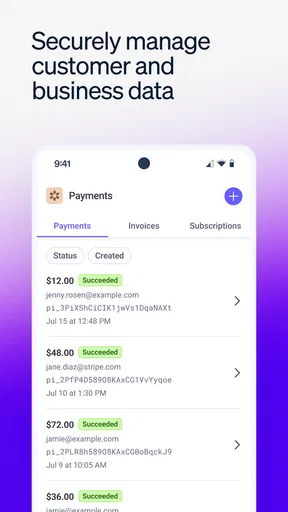
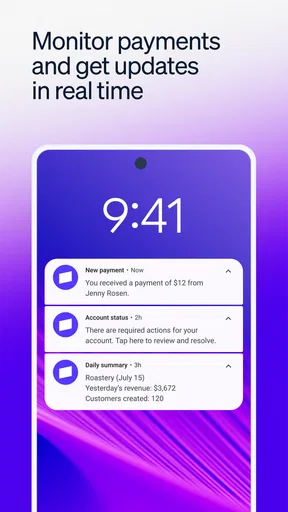
- Real-time payment and payout monitoring from a mobile device.
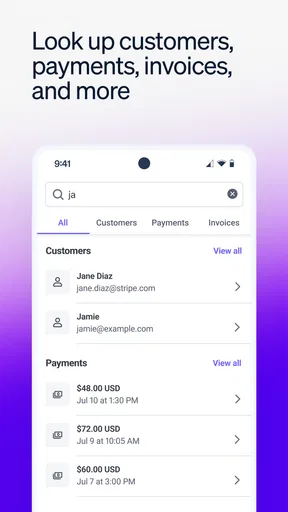
- Quick access to customer, invoice, and subscription details.
- Useful revenue charts help track business performance on the go.
- Supports multiple team members with configurable account permissions.
- Payment issue alerts can help you respond before customers are lost.
Limitations of Stripe Dashboard
- Some advanced settings are easier to manage from the web dashboard.
- The app is mainly useful for Stripe users, not general payment tracking.
- Reporting tools may feel limited compared with desktop analytics.
- Frequent notifications can become distracting for busy account owners.
- Access depends on a stable internet connection and an active Stripe account.
Similar Picks in This Category
View All
LinkedIn: Community & Network
LinkedIn3.8

Zoom Workplace
zoom.com4.1

Microsoft Teams
Microsoft Corporation4.6

Meta Business Suite
Meta Platforms, Inc.4.6

Webex Meetings
Cisco Systems, Inc.4.5

TeamViewer Remote Control
TeamViewer4.4
Frequently Asked Questions
What is Stripe Dashboard used for?
Stripe Dashboard is the management center for businesses that use Stripe to accept and process online payments. After signing in, you can review transactions, issue refunds, check payouts, manage customers, create payment links, monitor disputes, and view financial reports. It is mainly designed for business owners, administrators, and teams that need to supervise payment activity rather than shop or make personal payments.
Can I manage my Stripe account from the mobile app?
Yes, the Stripe Dashboard mobile app lets you monitor important business activity from an Android or iOS device. Depending on your account permissions and enabled Stripe services, you can review payments, receive notifications, issue refunds, inspect customer details, and follow account alerts. Some advanced configuration, reporting, and development features may still be easier or available only through the full web Dashboard.
Is Stripe Dashboard safe to use for managing payments?
Stripe Dashboard includes security features intended to protect sensitive business and payment information, such as account authentication, team permissions, alerts, and secure access controls. However, the app does not remove the need for good security practices. Use a strong, unique password, enable two-factor authentication, keep your device updated, and avoid signing in through suspicious links or unsecured shared devices.
Does Stripe Dashboard charge an additional fee?
The Stripe Dashboard itself is generally included with a Stripe account, but using Stripe payment products can involve processing fees, currency conversion charges, payout costs, or other service-specific pricing. The exact amount depends on your country, payment method, account setup, and selected Stripe products. Before relying on the platform for business operations, review Stripe’s official pricing and account terms for your region.
Can multiple employees use the same Stripe Dashboard account?
Businesses can usually invite team members to their Stripe account and assign roles or permissions instead of sharing one login. This makes it easier to control who can view financial information, handle refunds, manage settings, or access sensitive tools. Before adding staff, carefully review each permission level, remove access when someone leaves, and require appropriate authentication to reduce the risk of unauthorized account activity.
